Checkify lets a business ask for a specific proof, the user approves it, and the business receives a trusted result without collecting unnecessary personal data.
A Checkify Pass can request one proof or multiple proofs together, such as human verification, age threshold, or approval for a specific action.
Works for websites, apps, WordPress, WooCommerce, QR codes, and physical locations.
A business creates a site, the site creates Checkify Passes, and each Pass defines the proof the user is asked to approve.
The business is the organisation, venue, shop, website owner, or service provider asking for proof.
Businesses can increase their verification level over time so users have more confidence in who is requesting the proof.
A site is where verification happens. It can be a website, app, checkout flow, physical shop, venue, counter, or QR location.
Sites are where Checkify Passes are created and managed.
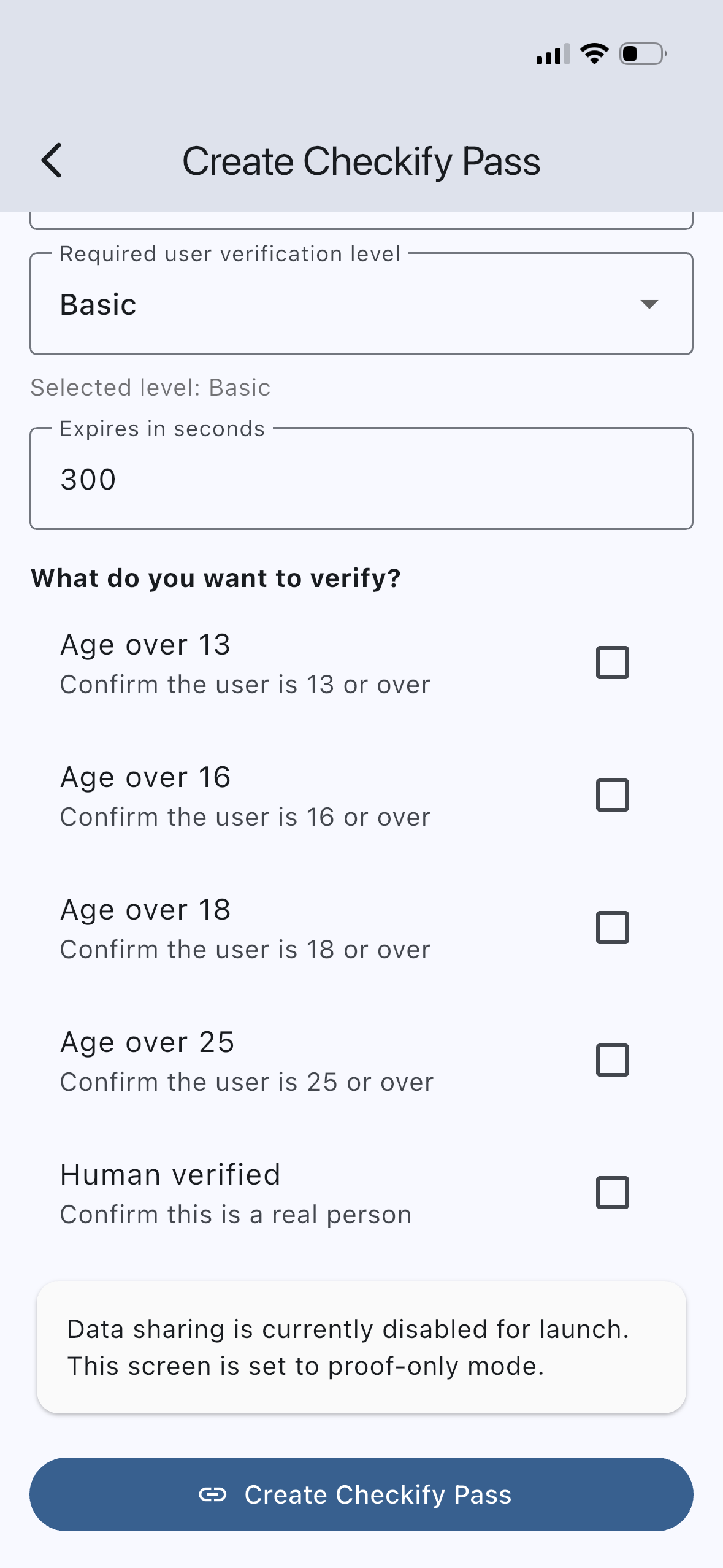
A Checkify Pass is the proof request shown to the user.
A Pass can ask for human verification, age thresholds, or multiple proofs in one request.
Checkify is designed to make verification clear for the business and controlled by the user.
Step 1
The business chooses what proof it needs. For example, a website may ask for human verification before a form is submitted, or a vape shop may ask for an age threshold before checkout.
Step 2
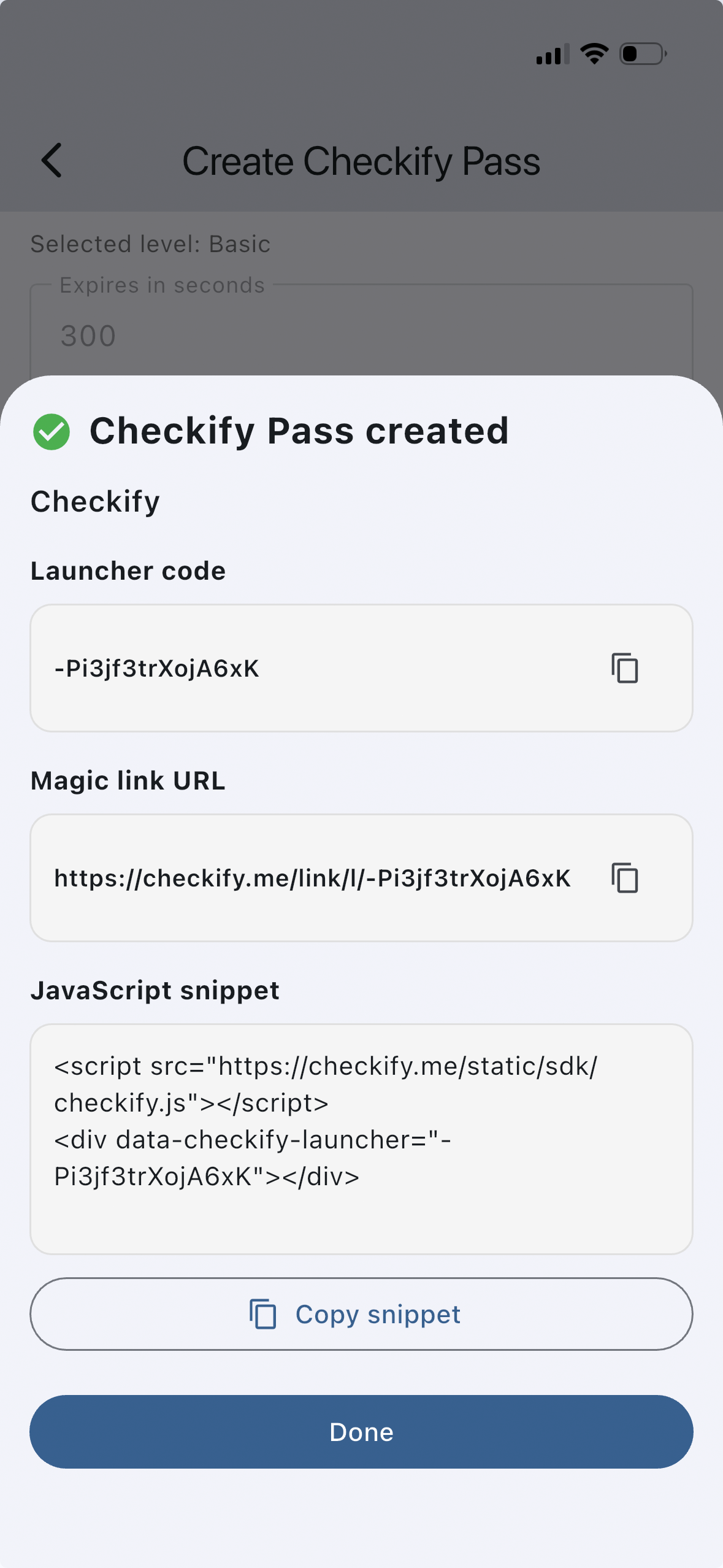
The Checkify Pass can appear on a website, inside a WordPress plugin, at WooCommerce checkout, in a custom integration, or as a QR code at a physical location.
data-checkify-pass="YOUR_PASS_ID" data-checkify-request="human"
Step 3
The user sees what is being requested and chooses whether to approve it. The goal is to make the request narrow, clear, and consent-based.
Step 4
Once the user completes the Checkify Pass, the business receives the result it needs to continue the flow.
{
  "status": "completed",
  "human_verified": true,
  "age_over_18": true
}The same proof-first approach can support websites, WordPress, WooCommerce, custom integrations, and QR-based in-person checks.
Add human verification before contact forms, account creation, or sensitive submissions.
Request age or human verification before checkout completion.
Use a Checkify Pass ID in your own website, app, or custom flow.
Show a QR code at a shop, desk, reception, counter, venue, or collection point.
A business often needs a trusted answer, not the raw personal data behind that answer. Checkify is built around requesting the narrowest proof needed for the flow.
This helps users stay in control and helps businesses avoid becoming large identity data stores when a simple proof is enough.
The goal is not to remove verification. The goal is to make verification more focused, more private, and less risky for both sides.
Collect personal data first, then decide what to do with it.
Ask for the specific proof needed and return a trusted result.
Start small with one site and one Checkify Pass. Expand once the flow is working.
Create a business profile so users know who is requesting the proof.
Add a website, app, checkout flow, venue, or physical location.
Choose the proofs you want the user to approve.
Add the Pass ID to your integration, plugin, website, or QR flow.
No. CAPTCHA replacement is an easy starting point, but Checkify is designed for proof-based trust flows such as age checks, account protection, approvals, and QR-based verification.
A Checkify Pass is the proof request shown to the user. It defines what the business wants to verify and can include one or multiple proofs.
Yes. A Pass can request multiple proofs together, such as human verification and an age threshold in the same flow.
Checkify is designed to avoid unnecessary sharing by default. The business should request the narrowest proof needed for the flow.
Yes. Physical sites can use QR-based Checkify Passes for counters, venues, receptions, events, or collection points.
The business receives a proof result or verification outcome, such as completed, human verified, or age threshold confirmed, depending on the Pass configuration.
Start with one business, one site, and one proof request. Then expand to more flows when ready.